
Let Claude create your ads, here's how.
Connecting AdPanel to Claude lets you create UGC video ads, product shots, and store-URL videos directly in chat. It uses the Model Context Protocol (MCP) so Claude can run generations and deliver finished ads to your AdPanel account.
Step 1: Add AdPanel as a Custom Connector
- Open the Claude desktop app or go to claude.ai in your browser.
- Go to Settings and select Connectors.
- Click Add custom connector.
- Set the Name to AdPanel.
- Paste this URL into the URL field:
https://www.adpanel.io/api/mcpClick Add.
Step 2: Connect and Sign In
- After adding the connector, click Connect.
- Claude will redirect you to sign in to your AdPanel account and authorize the connection. You'll see which email is being connected and your credit balance — use the same account you see at adpanel.io. No account yet? You'll create one during this step.
- When sign-in completes, AdPanel should show as connected under Settings → Connectors.
Step 3: Allow AdPanel Tools (after connecting)
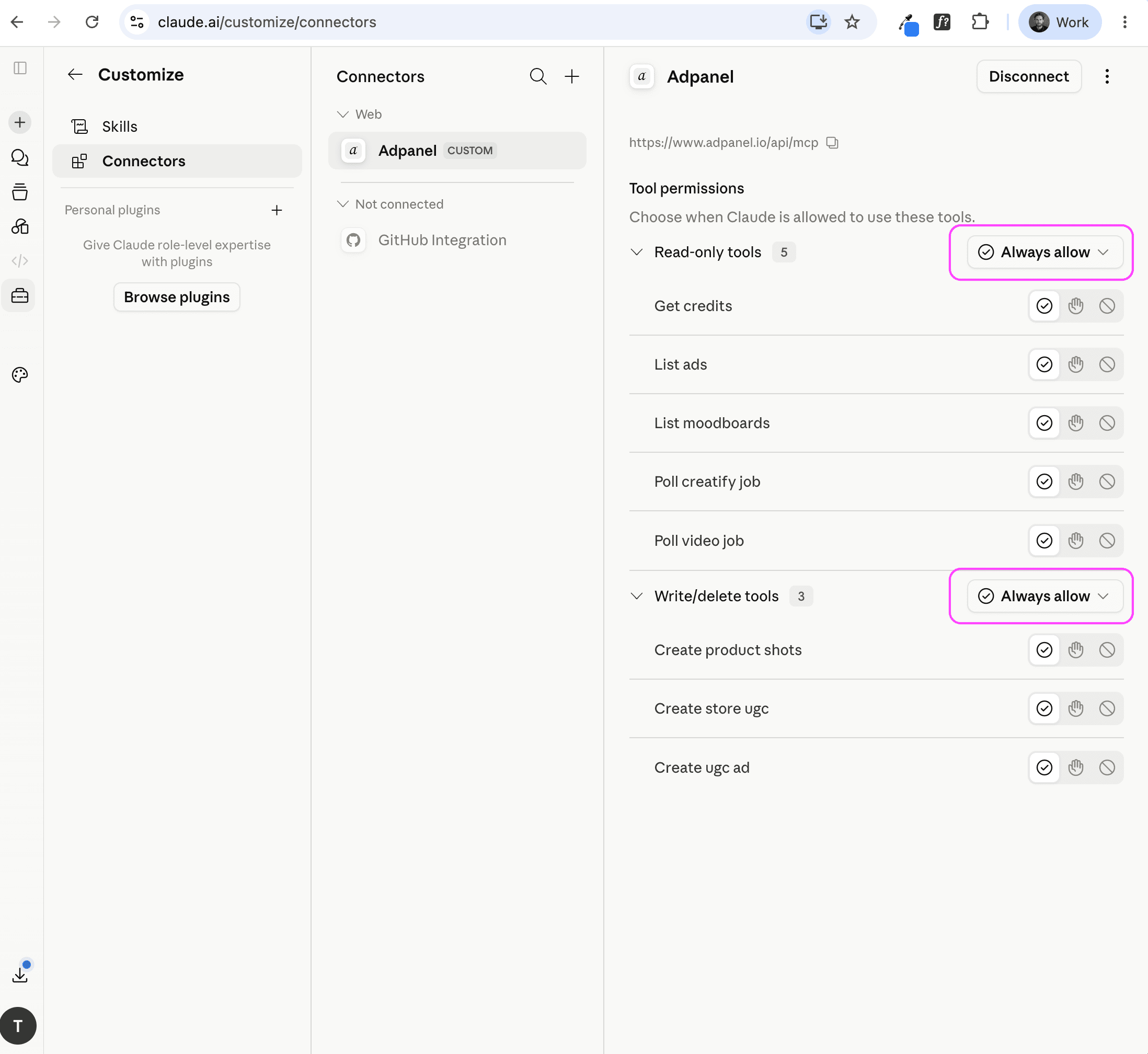
This step happens after the connector is connected — not during sign-in. Claude defaults every tool to Needs approval. Change them so Claude can run AdPanel without asking every time.
- Go to Settings → Connectors → AdPanel.
- Under Read-only tools, click the checkmark icon on each tool (or use the category menu) and set them to Always allow.
- Under Write/delete tools (create UGC ad, product shots), set those to Always allow as well if you want Claude to generate ads without a prompt each time.
Finished ads appear in My Ads on adpanel.io.
Step 4: Prompt Claude to Create Ads
Once connected, ask Claude to create ads using AdPanel. For example:
- UGC ad: “Using AdPanel, create a UGC ad with this product image URL and this reference video URL.”
- Product shots: “Using AdPanel, generate product shots from this product image and this style reference.”
- From a product page: “Find the main product image URL on this Shopify page, then use AdPanel to create a UGC ad with it.”
Images in chat: AdPanel tools need public HTTPS image URLs — not local files. If you drag a screenshot into Claude, ask Claude to upload it somewhere reachable or to find the official product image online first. This is a Claude/MCP limitation, not an AdPanel one.
Claude will call AdPanel, run the generation, and poll until your ad is ready. You need credits on your AdPanel account to generate.